Case Study
Automating the Monthly File Run for Every Bank, Payroll Office and Partner
By Rohit Menon

Picture the last week of the month in many businesses. One person, often the only one who really knows how it works, opens last month's spreadsheet, pastes in this month's figures and starts reshaping them. The bank wants one layout. The payroll office at a large customer wants another. A partner wants two linked workbooks with only certain columns. The tax return needs yet another set of fields. The data is the same every time. Only the shape changes.
If that sounds familiar, this article is for you. It is a job software should be doing, and it is the kind of system Dev3 Studio builds and runs for clients today, including a South African payments provider whose monthly run now produces every partner's file automatically.

Why every partner wants something different
Banks, payroll offices, insurers, medical aids, large retailers and government bodies all receive data from many sources. To process it at scale, each one fixes an exact layout and refuses anything else. Some of the layouts you will meet:
- Fixed-width text files, where every field must start at an exact character position and be padded with spaces or zeros. One character out of place and every line after it is misread.
- Files without headers, where the receiver knows column four is the amount and expects nothing else in that spot.
- Header and trailer lines that state how many records the file holds and what they add up to, so the receiver can tell at a glance whether anything went missing.
- Specific spreadsheets, sometimes two linked workbooks, with fixed column names, date formats and amounts in cents rather than rands.
- Prescribed submissions to SARS or an industry regulator, where published validation rules decide whether your file is accepted.
These layouts are not static either. Banks and regulators update their standards over time. South Africa's own payment systems, for example, have been moving to the international ISO 20022 messaging standard, and every change like that ripples into the files businesses send.
The real cost of doing it by hand
Reformatting by hand is slow, but time is not the biggest cost. The bigger cost is what happens when a file is wrong.
People are good at many things, but copying and reshaping thousands of rows is not one of them. In one summary of 14 controlled studies, people building simple spreadsheets got about 4 cells in every 100 wrong. Across a file of thousands of lines, that is not a question of whether a mistake slips in, but how many.
And the feedback often arrives late. A bank may reject a payment batch the same day. A payroll office may only tell you weeks later, after its own run, that a handful of deductions did not go through because an employee number had one character too many. By then, money you were expecting has not arrived, customers or staff are asking questions, and someone has to work out what went wrong, fix it and send it again before the next cut-off.
The business costs add up quickly:
- Delayed revenue. A rejected collection file means money arrives a month late, or not at all.
- Hours lost every month. Skilled staff spend days on a job that adds no value.
- Key-person risk. When the one person who knows the process is on leave or resigns, the month-end run is at risk.
- Damaged trust. Partners notice who sends clean files and who does not.
What we build instead
The idea is simple: keep one trustworthy set of records, and let the system produce each partner's file from it, exactly as that partner wants it. Here is what that looks like in practice.
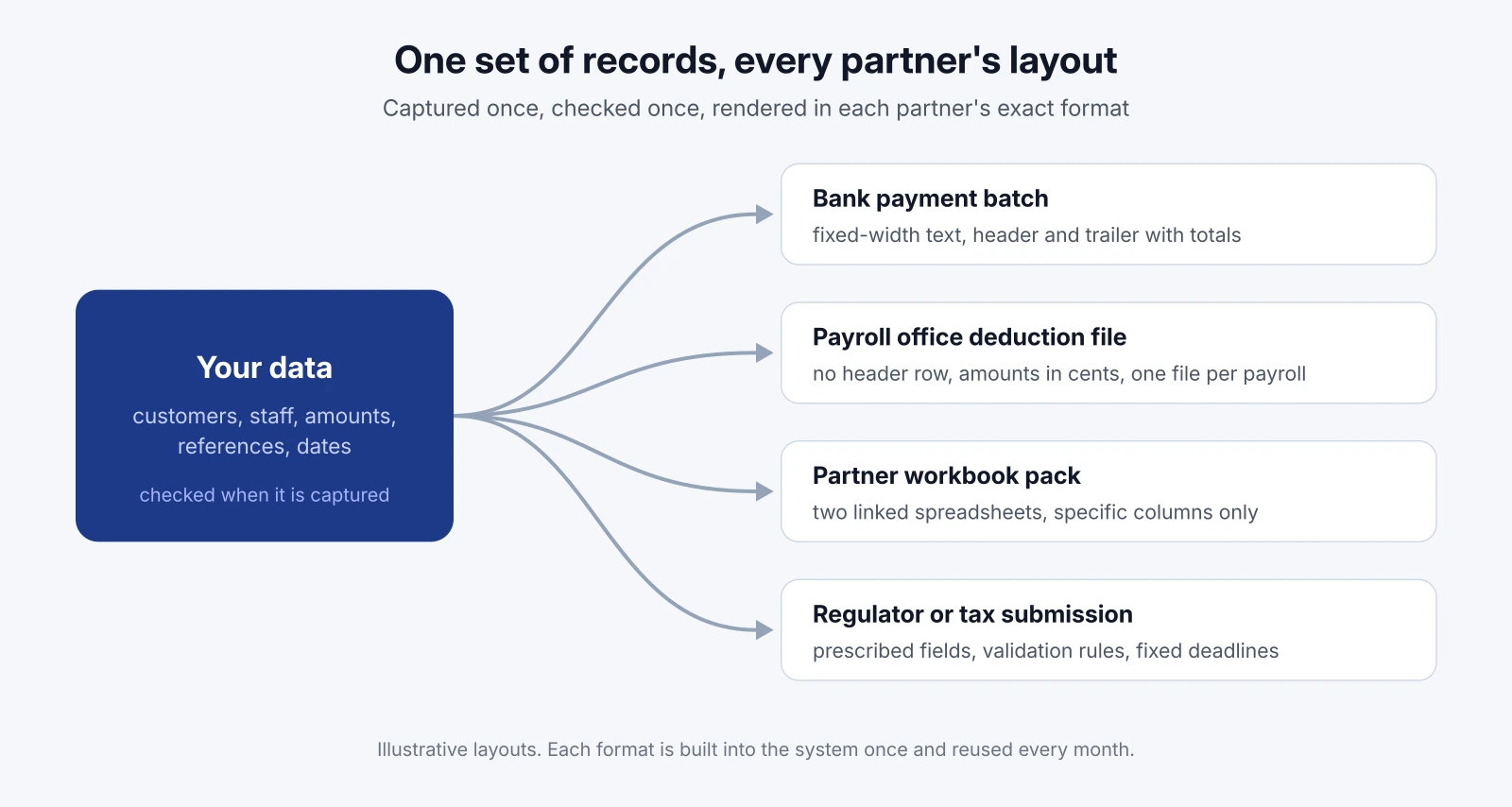
Each partner's exact format, built in
We study each partner's specification, and where one does not exist, we work from a real file that partner has already accepted. The format then becomes part of the system: which fields go where, how amounts are written, what the trailer must say, even what the file is called. Each customer or partner record simply notes which format it uses.
For the payments provider, at least seven distinct partner formats are now generated automatically. They range from a simple five-column workbook to fixed-width text files with headers, trailers and control totals, a headerless deduction file, and a pack of two linked workbooks. When one partner asked for a separate file for each of its payrolls, that became a setting rather than a monthly manual split.
Partner rules checked when the data is captured
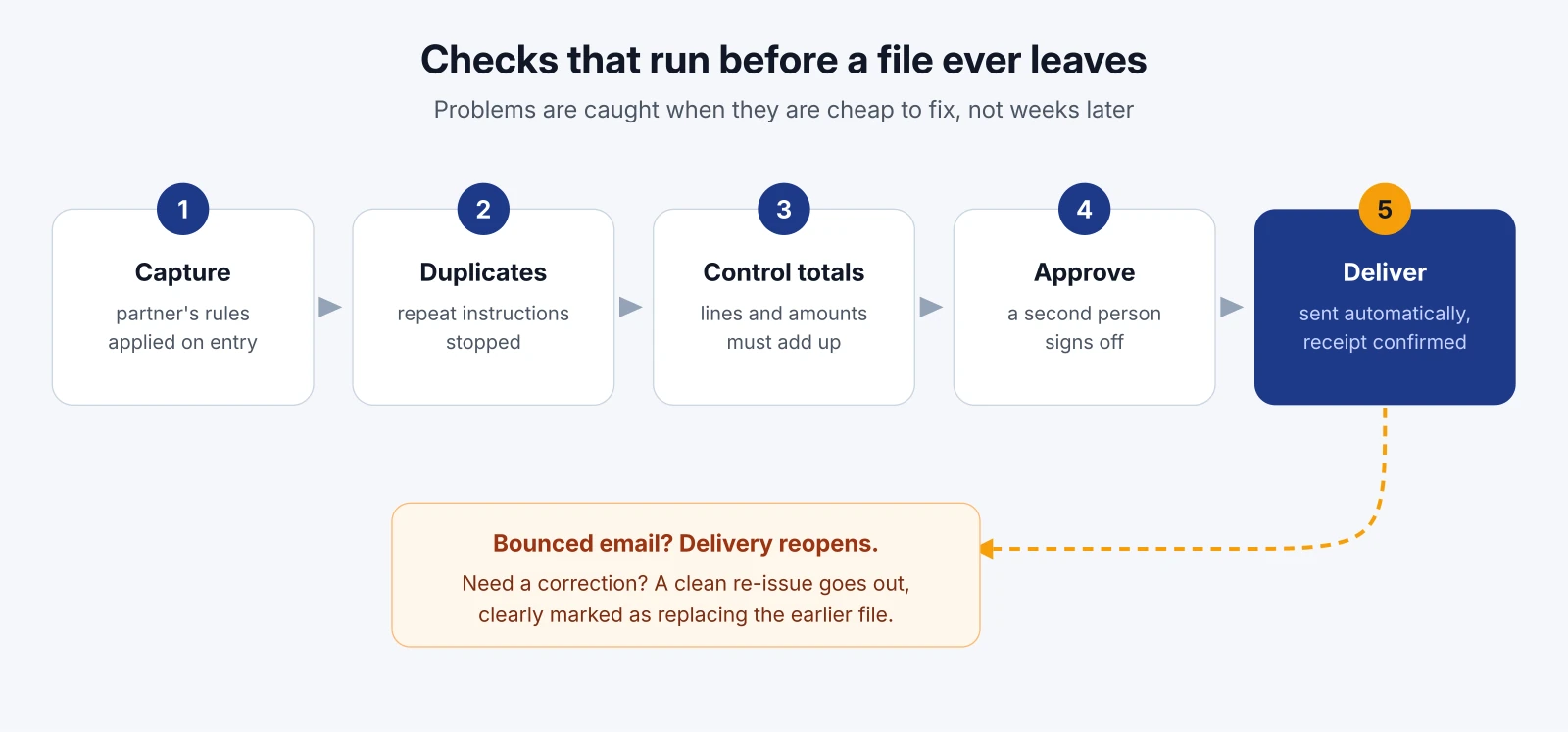
This is the part that changes everything. If a partner's file can only hold a ten-character employee number, there is no point discovering that on the day the file is due. So we apply each partner's rules at the moment the data enters the system: when someone captures a record, uploads a list or imports a spreadsheet.
A value that the partner would reject is flagged straight away, in plain words, weeks before the deadline, while the person who entered it still remembers where it came from. The system also shows a running list of anything that would stop a file going out, so nothing is left for the last day.
Control totals and duplicate checks before release
Before any file is released, the system adds up the number of lines and the total amount and checks them against what it expects. If they do not match, the file does not go.
It also looks for duplicate instructions, such as the same person and the same reference appearing twice, and stops them before they can cause a double debit or a double payment. Catching a duplicate before release costs nothing. Catching it after the money has moved costs a refund, an apology and sometimes a customer.

Delivery that confirms the file arrived
Sending a file is not the same as the partner receiving it. Once a file is approved, the system emails it to the right contact at the partner automatically. It then keeps watching for bounce notices. If an email bounces, the delivery is marked as failed, the team is alerted, and the delivery is reopened so it can be sent again. Nobody has to wonder whether last Tuesday's file actually landed.
Clean corrections, clearly labelled
Sometimes a file needs to change after it has gone, for example because the partner's own data changed. Instead of sending a loose spreadsheet with "updated" in the file name, the system issues a clean replacement. It goes through the same review as the original, and the covering email states clearly which earlier version it replaces, that the earlier file must not be processed, and why it changed. The original stays on record, so there is always a clear history of what was sent and when.
How we make sure the files are right
A generated file is only useful if the partner accepts it, so we test against reality rather than assumptions. For the payments provider's first format, we generated the file from the system and compared it line for line with a real 2,704-row export from a live month. Every line matched, and so did the control totals.
Each new format follows the same approach: build it from the partner's specification or an accepted file, compare the output with a real example, and confirm any open questions with the partner before it goes live. Monthly runs now run to tens of thousands of lines, and the system has had no downtime since it went live.
We also use AI as a working tool throughout this kind of project. It helps us read long partner specifications, compare large files quickly, draft test cases and investigate anything unusual in a run. Every result is checked by an engineer, but it means we can cover more ground, faster, for the same budget.

Where this applies
The payments example involves payroll deduction files, but the same pattern fits almost any recurring file your business sends:
- Bank payment batches for salaries, supplier payments or refunds.
- Debit-order collection files, where a rejected line means a missed collection.
- Supplier and retailer EDI, such as orders, invoices and delivery notes for large customers.
- Payroll exports to a bureau, a pension fund or a medical aid.
- Returns to SARS or a regulator, where the format and the deadline are both fixed.
If you send the same kind of file every week or month, and someone has to reshape data to do it, it is a good candidate.
What this means for your business
Automating your file run is not about technology for its own sake. It changes a few very practical things:
- Your month-end gets shorter. Days of reformatting become a review and an approval. Your skilled people get that time back for work that actually grows the business.
- Money arrives on time. Files that pass the partner's rules the first time mean collections and payments are not pushed into next month.
- Problems surface early. Bad data is caught when it is captured, weeks before a deadline, instead of after a rejection.
- You are not dependent on one person. The process lives in the system, not in someone's head or a fragile spreadsheet.
- You have a clear record. Every file, every correction and every delivery is logged, which helps with audits, disputes and partner queries.
- You can say yes to new partners. Adding a new bank, client or payroll office means adding a format, not adding a person.

How Dev3 Studio can help
At Dev3 Studio we build process automation and integrations for businesses in South Africa and abroad. For recurring partner files, we typically start by looking at the files you send today, who receives them and where they go wrong. From there we build each partner's format into a system that captures your data once, checks it against every partner's rules, and delivers clean files on time, with a full record of what was sent.
You can start small with the one file that causes the most pain, then add the rest as each one proves itself. If your month-end still depends on reshaping spreadsheets by hand, get in touch and we will show you what it could look like when software does that work for you.

What kinds of files can be automated this way?
Almost any file you send on a regular schedule in a fixed layout: bank payment batches, debit-order collection files, supplier and retailer EDI documents, payroll exports to bureaus, pension funds or medical aids, and returns to SARS or an industry regulator. If someone reshapes the same data every week or month to send it, it is a good candidate.
What if a partner does not have a written file specification?
We work from a real file that partner has already accepted, build the format from it, and compare our generated output with that real file line by line. Anything we cannot work out from the example, we confirm with the partner before the format goes live.
How do you stop a partner rejecting our file weeks later?
Each partner's rules are applied when the data is first captured, uploaded or imported, not on the day the file is due. Values the partner would reject are flagged straight away, and control totals and duplicate checks run before any file is released.
What happens if a file needs to be corrected after it has been sent?
The system issues a clean replacement that goes through the same review as the original. The covering email states which earlier version it replaces, that the earlier file must not be processed, and why it changed, and the original stays on record.
Do we have to automate every file at once?
No. Most businesses start with the one file that causes the most work or the most rejections, then add other partners' formats once the first one has proved itself in live runs.