Case Study
Bringing Automation Into the Slack, WhatsApp and Support Tools Your Team Already Uses
By Rohit Menon

Most businesses don't have a software problem. They have a switching problem. Customers phone the office for information they could fetch themselves, if only it were somewhere they already look. Managers open five systems to make one yes-or-no decision. Support staff type the same answers all day while the details they need sit in another tab.
The usual fix is another system: a new portal, a new app, a new login. Each one asks busy people to change their habits, and many never do. We take the opposite approach. The most useful automation we build shows up in the apps people already have open: WhatsApp for customers, Slack for staff, and a single workspace for the support team where AI does the first draft and a person makes the call.
Here is what that looks like in practice, drawn from work we do for two clients: a South African payments provider and a US online gaming platform we support.

Why "where people already are" matters
In South Africa, the place people already are is WhatsApp. Meltwater's summary of the 2025 Global Digital Report names it the country's most used social platform, used by 93.8% of active users, who spend close to 24 hours a month in it. With 51.7 million South Africans online by late 2025, according to DataReportal, that is a channel your customers check far more often than your website or your email.
Inside the business, the equivalent is the team chat tool. For many companies that is Slack. Alerts already land there, colleagues already talk there, and managers already check it from their phones between meetings.
Building into these channels removes three costs at once. Customers stop phoning for routine things. Staff stop hopping between systems. And nobody needs training on a tool they already use every day.
Customer self-service: statements on WhatsApp
Our payments provider client processes monthly deductions for employees across many employers. A common request from those employees is simple: "Can I have my statement for this month?" Traditionally that means a call or an email, and a staff member digging out the document by hand.
We connected that request to a WhatsApp chatbot. The customer gives the details the chatbot asks for, then chooses "1" for this month or "2" for last month. We deliberately kept it to a numbered choice, because typing a month in free text invites mistakes. The system accepts natural replies like "1.", "1: this month" or even the number emoji, and politely refuses anything ambiguous.
Behind the scenes, the request is verified and accepted within seconds, then queued. The system builds the statement from reconciled figures, protects the PDF with a password tied to the customer's own details, and sends it straight back into the same chat. If there is no statement for that month, the customer gets a clear reason instead of silence.
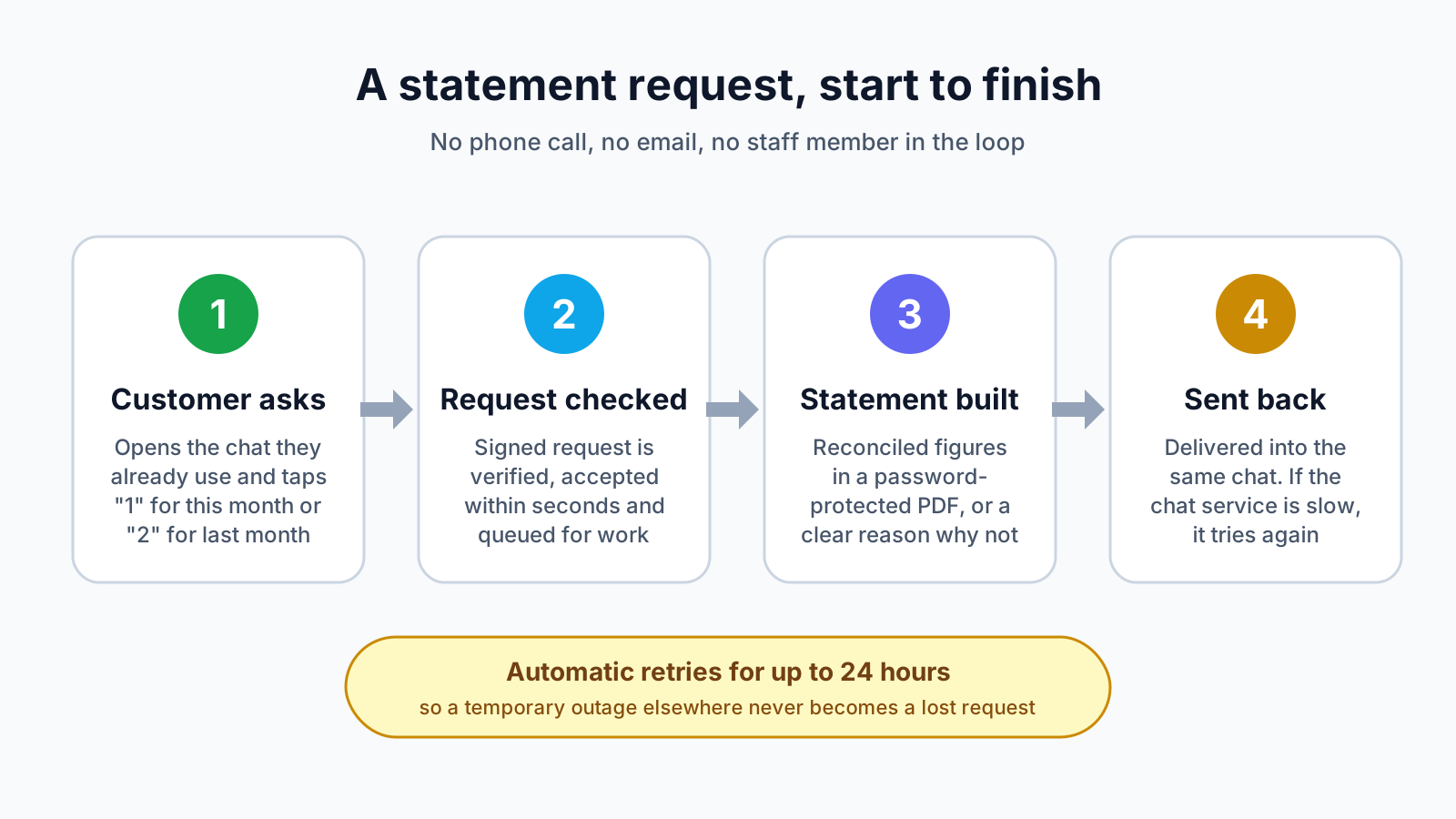
The part customers never see is the resilience. Chat services, like any outside provider, sometimes have slow moments or short outages. Rather than letting a request disappear, the system keeps retrying delivery for up to 24 hours, waiting a little longer between each attempt. A hiccup on someone else's side never turns into a customer who thinks they were ignored.
The same thinking runs through the rest of that platform. Members can pull the same password-protected statement from inside a mobile app, generated on request rather than stored. Staff can approve or reject a whole batch of submissions in one action instead of one at a time. And reports come out as Excel as well as PDF, with reference numbers kept as text so leading zeros survive, because that is the tool the finance teams who receive them actually work in.
Decisions in Slack: approve with one tap
On the gaming platform, some customer requests need a manager's sign-off before they go ahead. Previously, that meant noticing an alert, opening the admin system, finding the request and deciding.
Now the alert in Slack carries Approve and Deny buttons. The manager reads the summary and decides on the spot, from a laptop or a phone.

Convenience never comes at the cost of control. We built in the same safeguards the main system has:
- Only the right people can decide. A Slack account must be linked to an active staff member who holds the approval permission. Anyone else who taps the button is turned away.
- Nobody approves their own request. The person who raised it cannot sign it off, so there are always two sets of eyes.
- Buttons expire. An old message can't be acted on hours later, after circumstances have changed.
- Sensitive cases step up. If an approval needs extra identity checks, the manager is sent to finish it in the main system with their passkey or authenticator code.
- Everything is recorded. Each decision is logged against the person who made it, and the message is cleared afterwards so nobody acts on it twice.
The result is faster decisions with an audit trail at least as strong as before.
A support desk where AI drafts and people decide
Support is where switching costs hurt most. A support team member answering one customer might need the conversation, the customer's account history, recent payments and a set of standard actions, often spread across several screens.
We rebuilt the gaming platform's support workspace so everything sits side by side: the queue on the left, the conversation in the middle and the customer's details on the right. The most common actions, such as restoring a lost reward or applying a self-requested break from play, are one click away, and each ends with an editable reply ready for the team member to send.

We use AI proactively here, in three specific ways:
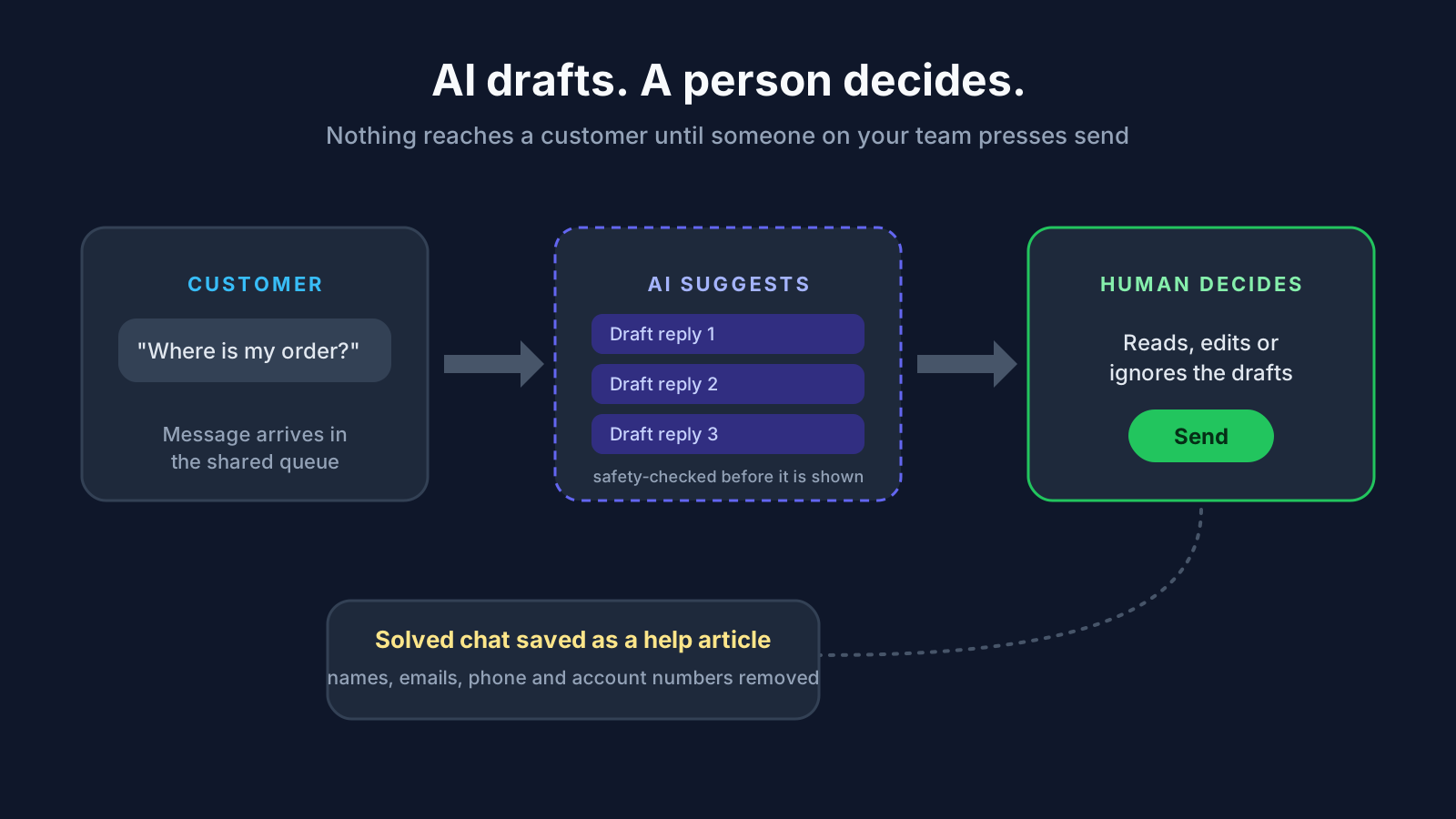
- Suggested replies. While a team member works a chat, the workspace shows up to three draft replies to the customer's latest message. Clicking one drops it into the reply box to edit. Nothing is ever sent automatically, and drafts that don't pass safety checks are never shown.
- Handover summaries. When an automated chat needs a human, the person taking over receives a short brief: what the problem is, what the customer has already been told, the relevant account facts and a suggested next step. The customer doesn't have to repeat themselves.
- Help articles from solved chats. A well-handled conversation can be saved as a draft help article. Names, email addresses, phone numbers and account numbers are stripped out first, and the system will not publish an article that still contains personal details. Good answers become reusable without putting anyone's privacy at risk.
Small frictions get the same attention. Customers often send a screenshot or a phone photo to explain a problem. Large images and iPhone photo formats are now converted and resized automatically on the customer's device before upload, so the picture simply arrives.
Picking up where customers left off
Abandoned purchases and half-finished requests are usually treated as lost. Often the customer was simply interrupted: a phone call, a dropped connection, a closed tab.
On the gaming platform, customers now see an "Unfinished purchase" prompt that lets them pick up exactly where they left off, or dismiss it and choose something else. Pending purchases can also be resumed from their transaction history. Part-completed requests are remembered on the customer's device for seven days, so returning tomorrow doesn't mean starting again. We designed what is kept carefully: amounts and choices are remembered, but consent and identity details are never stored, and the server still checks everything before any money moves. The price shown is always refreshed to match the option the customer has selected.
For the business, every resumed journey is revenue or goodwill that would otherwise have walked away.
Taking the chores out of staff work
Not all automation faces customers. Some of the biggest time savings come from small, repetitive staff tasks.
When new products arrive on the gaming platform, each needs an image before it can go live. A Slack alert now links straight to a page listing exactly the items still waiting. Staff drag in a whole folder of images, and the system matches each file to the right product by name, crops it to the correct shape and resizes it. Only files it can't place confidently are flagged, with a shortlist of likely matches. Once an item has its image, it can be switched on from the same screen. A job that meant matching files one by one becomes a single drag and drop.
What this means for your business
You don't need to be a payments company or a gaming platform for this to apply. The same patterns fit any business that answers routine questions, approves requests or handles repetitive admin:
- Fewer routine calls and emails. Statements, invoices, balances, order status and appointment details can be self-served over WhatsApp, at any hour, without adding staff.
- Faster decisions. Approvals for refunds, discounts, leave or purchase orders can happen in your team chat with the same safeguards your main system has.
- More capacity in your support team. Side-by-side information and AI-drafted replies let the same team handle more conversations, with more consistent answers.
- Less lost revenue. Letting customers resume where they stopped recovers sales and requests that would otherwise be abandoned.
- Lower training costs. People already know how to use WhatsApp and Slack, so adoption is close to immediate.
- Stronger trust. Password-protected documents, permission checks, audit trails and careful handling of personal information support your obligations under laws such as POPIA.
People stay in control
Being open about AI matters to us. We use it wherever it saves people time: drafting replies, summarising conversations, sorting files and spotting patterns. But we design every system so that AI suggests and people decide. Support staff choose what to send. Managers approve what goes ahead. Personal details are removed before anything is reused. The aim is to take the repetitive typing and searching off your team's plate, not to hand your customer relationships to a machine.
How Dev3 Studio can help
Dev3 Studio builds process automation, web and mobile apps, and AI integrations for businesses in South Africa and abroad. We start by finding where your customers and staff lose time today, then bring the fix to the channels they already use: a WhatsApp flow for customer requests, approval buttons in your team chat, a support workspace with AI assistance, or a simple tool that turns an afternoon of admin into a few clicks.
If your team is answering the same questions every day, or your managers are logging into several systems to approve one request, we'd like to hear about it. Get in touch with Dev3 Studio and we'll help you work out where automation will pay for itself first.

Can customers really get documents like statements through WhatsApp?
Yes. A WhatsApp chatbot can collect the details needed to identify a customer, build the document automatically and send it back into the same chat as a password-protected PDF. For a South African payments provider we support, the system keeps retrying delivery for up to 24 hours if the chat service is briefly unavailable, so requests are not lost.
Is it safe to approve requests from Slack instead of the main system?
It can be, if the same safeguards apply. In the approval buttons we built, only linked staff with the right permission can decide, nobody can approve their own request, buttons expire, sensitive approvals require extra verification in the main system, and every decision is recorded against the person who made it.
Does AI send replies to our customers on its own?
Not in the systems we build. AI suggests draft replies and writes handover summaries, but a member of your team reads, edits and chooses what to send. Nothing reaches a customer until a person presses send.
How do you protect personal information when reusing support chats?
When a solved chat is saved as a help article, names, email addresses, phone numbers and account numbers are removed first, and the system refuses to publish an article that still contains personal details. This supports obligations under privacy laws such as POPIA.
Do our staff need training to use this kind of automation?
Very little. Because the automation lives in tools people already use every day, such as WhatsApp and Slack, adoption is usually close to immediate. The support workspace puts everything on one screen, which tends to shorten training rather than lengthen it.