Case Study
Turning Customer Spreadsheets Into Clean Data, Automatically
By Rohit Menon

Somewhere in your business, right now, someone is opening a spreadsheet that arrived by email. It came from a client, a supplier or a branch office. The columns are in a slightly different order from last month. A few amounts are written as "R11 500,00" and others as "11500.00". One row has no date. Before any of it can be used, someone has to tidy it up, retype parts of it, and probably send an email asking what a particular cell was meant to say.
It is one of the most common, least visible costs in a growing business. At Dev3 Studio we build systems that take this job off your team's plate: a self-service upload portal that reads the file, checks it, and helps the sender fix their own mistakes before anything reaches your records. This article explains how that works, using a real system we built and support for a South African payments provider.
Why Emailed Spreadsheets Cost More Than They Seem
Spreadsheets are flexible, which is exactly why everyone uses them. That same flexibility means no two senders fill them in quite the same way. The problems tend to repeat:
- Different templates. One client still uses last year's layout. Another has added their own notes column. A third has renamed "ID Number" to "ID No.".
- Invisible differences. Text pasted from a Word document or a PDF often carries hidden spacing characters. To a person, the heading looks right. To a computer, it is a different word.
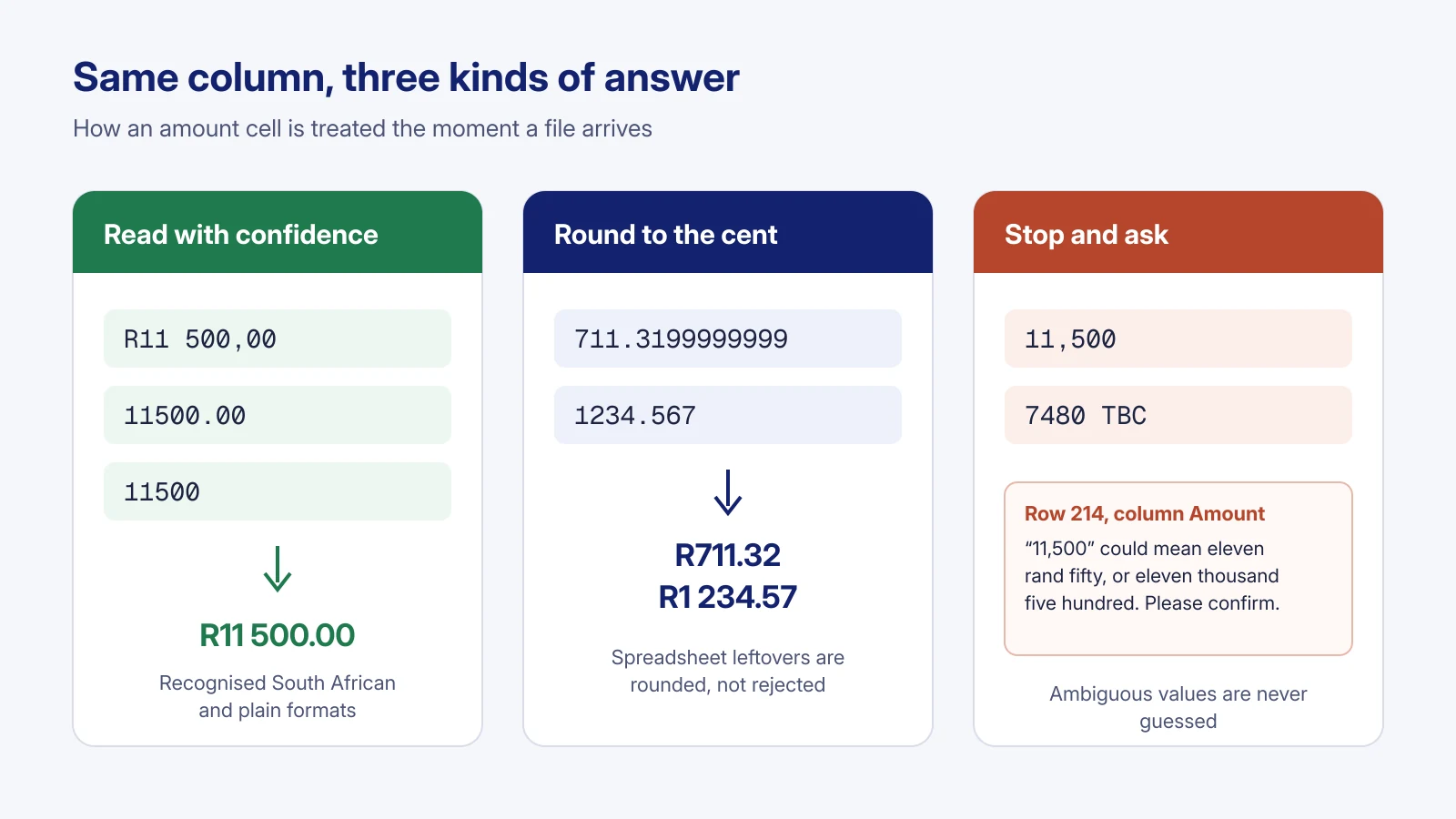
- Number formats. South Africans commonly write amounts with a space between thousands and a comma before the cents ("R11 500,00"). Many systems expect "11500.00". Spreadsheets also leave behind long tails of decimals, such as 711.3199999999, because of the way they store numbers internally.
- Missing or half-filled fields. A blank start date, an amount marked "TBC", a reference number typed twice.
Your team is then left with two poor choices. They can clean every file by hand, which is slow and easy to get wrong when you are on row 3,000. Or they can import the file as it is and hope, which is fast but risky.
The research suggests that hoping is not a strategy. In a summary of field audits of real business spreadsheets, researcher Raymond Panko found errors in 94% of the 88 spreadsheets examined. And Gartner estimates that poor data quality costs organisations an average of US$12.9 million a year. Most small businesses will never see a number that large, but the pattern holds at any size: bad data that gets in early is far more expensive to find and fix later.

The Hidden Cost Is the Back-and-Forth
The cleaning is only part of the cost. The bigger drain is the conversation around it. A staff member spots a problem, emails the sender, waits, gets a corrected file, finds another problem, and emails again. Each round can take a day or more, and the billing, payroll or reporting that depends on that data waits too.
This is where a well-designed upload portal changes the picture. Instead of your team acting as the go-between, the system tells the sender exactly what needs attention, the moment they upload, and lets them fix it themselves.
What We Build: An Upload Portal That Does the Checking
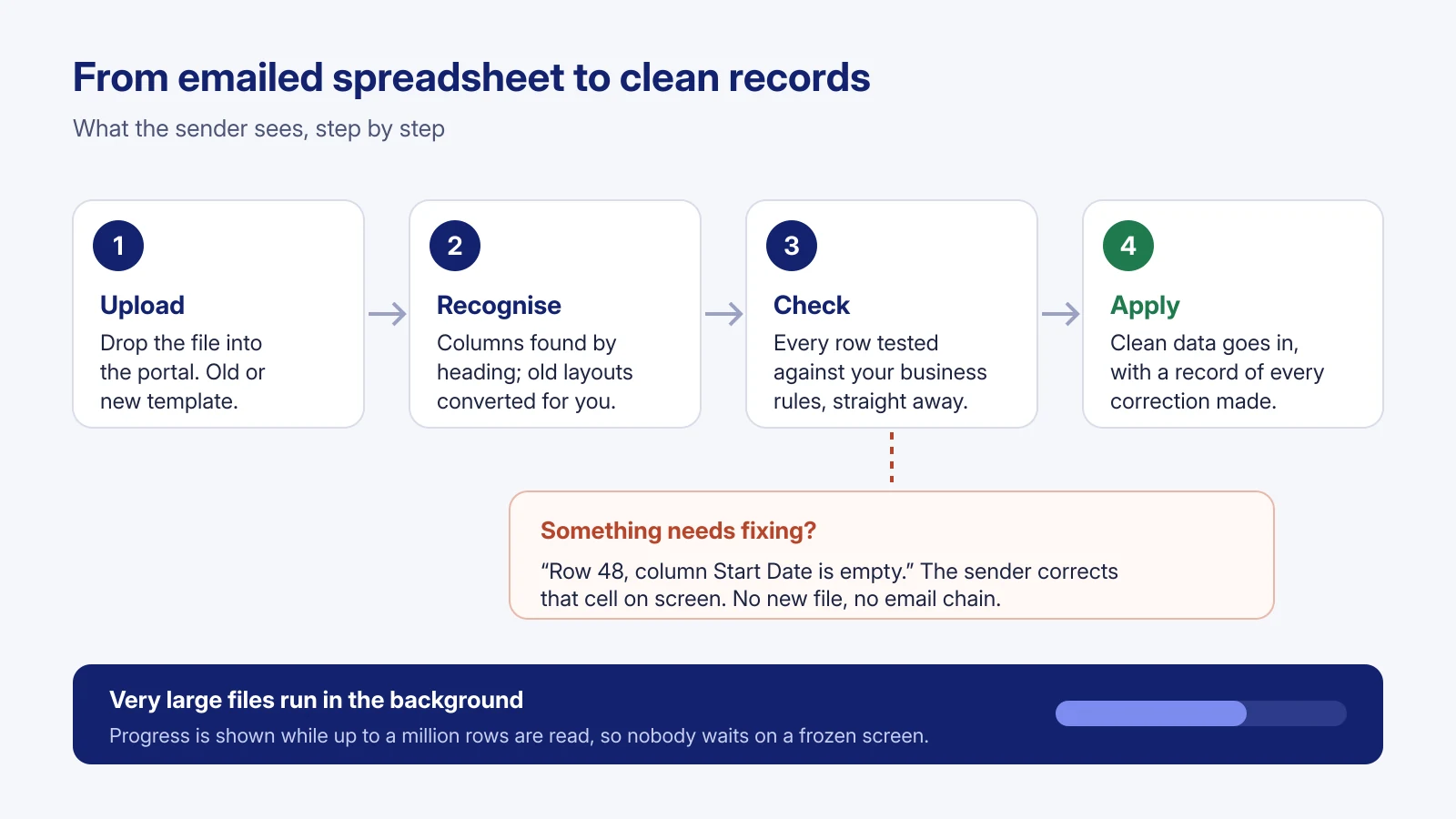
The portal we built for a South African payments provider receives files from the businesses it works with. Those partners upload spreadsheets of records every cycle, some small, some very large. Here is what happens when a file arrives.
It understands the file, even an older template
Columns are found by their heading, not their position, so a file still reads correctly if the columns are in a different order. Capital letters and stray spacing in headings are ignored, including the hidden characters that come from copying text out of Word or a PDF. Extra columns and extra sheets are simply left alone, so senders can keep their own notes and workings in the same file.
When the format changes, older files are not turned away. If a partner uploads a file in the previous template, the portal recognises it, explains in a short notice what has changed, and converts it automatically once they acknowledge the change. They can download the converted copy if they want one, but they do not have to.
Each downloadable template also carries a Guide sheet that explains every column, so the instructions live inside the file being filled in.
It checks every row against your business rules, straight away
As soon as the file arrives, every row is checked against the rules that matter to the business: required fields, valid dates, sensible amounts, references that should not appear twice, and so on. Nothing is applied to the live records until every row passes.
It names the exact row and cell to fix
When something is wrong, the message is specific. Not "your file has errors", but the row, the column and the text that was actually there, for example: "Row 48, column Start Date is empty." If a required column is missing altogether, the portal lists which columns it expected and could not find.
It rounds sensibly instead of rejecting
Not every oddity is a mistake. A spreadsheet that stores 711.3199999999 clearly means R711.32, so the portal rounds amounts like this to the nearest cent, consistently, rather than bouncing the file back to a sender who has done nothing wrong. Both common South African forms ("R11 500,00") and plain forms ("11500.00") are understood.
It refuses to guess when the data is ambiguous
This is the most important design principle in the whole system. Some values have more than one reasonable meaning. Is "11,500" eleven rand fifty, written the South African way, or eleven thousand five hundred, written the American way? Is "7480 TBC" an amount at all? A system that guesses will be right most of the time, and quietly wrong some of the time, and the wrong guesses are the ones nobody notices until a payment or a report does not add up.
So the portal does not guess. It accepts the formats it can read with certainty, and for anything else it stops and asks the sender, pointing at the exact cell. In the same spirit, it never fills a gap with an invented value. A missing start date is treated as something to fix, not quietly replaced with today's date.
For your business, that means the data in your system is data someone actually provided, not an assumption a computer made on their behalf.

Fixing Mistakes on Screen, Not Over Email
The biggest everyday change for the payments provider's partners is how corrections happen. A file with a few problem lines is no longer simply rejected. It stays waiting with a "has problems" status, and the sender can correct each flagged cell directly on screen until nothing is left to fix. Then it is applied as normal. If they prefer, they can still upload a corrected file instead.
Every correction is checked by exactly the same rules as the original file, so a fix cannot sneak past a rule the file itself had to meet. Each change is also recorded: what the line looked like before, what it looks like now, who changed it and when. The history can be opened line by line and exported, which gives the business a clear audit trail.
In practice, partners now sort out their own errors on screen, at the moment they upload, instead of over a chain of emails.
Built for Very Large Files
Some partners send small files. Others send very large ones. The original upload limit was 25,000 rows per file, which suited the business when it started. As volumes grew, we rebuilt the intake so a single file can hold up to a million rows.
Large files are processed in the background rather than while the person waits on a frozen screen. The file is read in steady batches, progress is shown on screen, and if something interrupts the work part-way, it picks up safely without doubling anything. In a test on the live production system, a million records were consolidated in about 108 seconds.
That headroom matters because growth rarely arrives gradually. A system that handles your biggest client's file as calmly as your smallest is one you do not have to replace when you win that client.
Where AI Fits In
We use AI proactively in our own work on systems like this. It helps us comb through upload error logs to spot patterns, such as a heading many senders type slightly differently, and to draft large sets of awkward test files full of odd formats. The rules themselves stay written down and predictable, because a business needs to know exactly why a value was accepted or refused.
What This Means for Your Business
You may not process payments, but if your business receives spreadsheets from other people, the same approach applies. Think of supplier price lists, client orders, staff rosters, stock counts, insurance schedules or monthly figures from branches. The value shows up in four places:
- Time back for your team. Staff stop retyping, reformatting and chasing. The people who send the files fix their own mistakes, in the moment, while the details are fresh.
- Faster turnaround. Corrections that used to take days of email can be done in a single sitting. Whatever depends on that data, from invoicing to payroll, moves sooner.
- Lower risk. Because the system refuses to guess and never invents missing values, what goes into your records is what was actually supplied. Mistakes are caught at the door, where they are cheapest to fix.
- More trust from clients and suppliers. A clear portal with plain instructions and specific feedback feels professional. Senders know where they stand, and so do you, with a full record of every change.

How Dev3 Studio Can Help
Dev3 Studio is a South African software studio that builds web applications and process automation for businesses here and abroad. If your team spends hours each week cleaning spreadsheets, or you are worried about what slips through when they do not, we can help you design an upload portal around your own templates and business rules.
We start with the files you actually receive and the rules your data needs to meet, then build a portal that reads your formats, checks every row, explains problems in plain language and lets senders fix them on screen. We stay on afterwards to keep it running and adapt it as your templates change.
If that sounds useful, get in touch with us and tell us about the spreadsheets that land in your inbox.

What is a spreadsheet upload portal?
It is a secure web page where your clients, suppliers or branches upload their spreadsheets directly. The portal reads the file, checks every row against your business rules, and tells the sender exactly which row and cell needs fixing before anything reaches your records.
Do my clients have to change the spreadsheets they already use?
Usually not much. Columns are found by their heading rather than their position, extra columns and sheets are ignored, and files in an older template can be recognised and converted automatically. A downloadable template with a built-in guide sheet helps new senders get it right first time.
How does the system handle South African number formats like R11 500,00?
It understands both the common South African form, with spaces between thousands and a comma before the cents, and plain forms such as 11500.00. Long spreadsheet decimals are rounded to the nearest cent. Values that could mean more than one thing are never guessed; the sender is asked to confirm them.
Can it cope with very large files?
Yes. In the system we built for a South African payments provider, a single file can hold up to a million rows. Large files are processed in the background with progress shown on screen, and in a production test a million records were consolidated in about 108 seconds.
What happens when a sender makes a mistake?
The file waits with a clear list of problems. The sender corrects each flagged cell on screen, and every correction is checked by the same rules as the original file and recorded with who made it and when. Nothing is applied until every row passes.