Case Study
Monitoring the Business Problems That Actually Cost You Money
By Rohit Menon

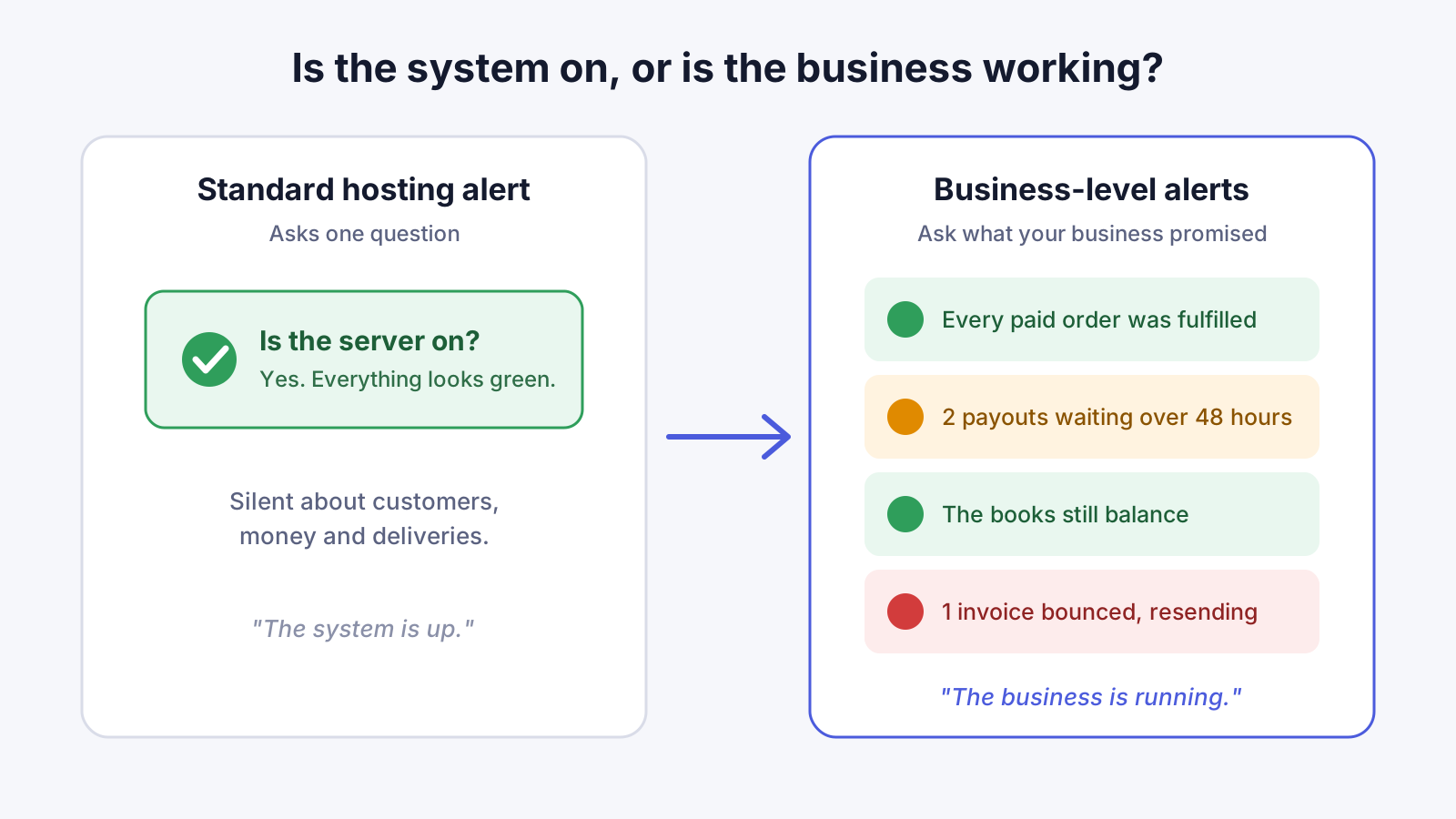
Most businesses that run online have some kind of monitoring. A service checks the website every minute, and if it stops answering, someone gets an email. That is useful, and every system should have it. But it answers only one question: is the system switched on?
It does not tell you that a customer paid last night and never received what they bought. It does not tell you that a payout to a supplier has been sitting in "processing" for three days, or that an important document you emailed to a client bounced back and nobody noticed. In all of those cases the server is up, the dashboard is green, and the business is quietly losing money and goodwill.
At Dev3 Studio we build a second layer of monitoring into the systems we deliver: alerts tied to business outcomes. Here is what that means, how it works for two large clients we support, and what it could do for your business.
"The system is up" is not the same as "the business is running"
When owners hear "monitoring", they usually picture uptime: the website loads, the app opens, the payment page responds. Those things matter, but the failures that cost the most are rarely that loud. They tend to be quiet ones:
- An order is paid but not fulfilled. The payment went through, but the step that ships the item, activates the account or books the service did not happen.
- Money is stuck. A refund, a payout or a supplier payment has been "in progress" far longer than it should be.
- The books no longer balance. What your system says customers own, owe or are due no longer adds up.
- A document never arrived. An invoice, payslip file or contract was "sent", but the email bounced.
None of these switches a server off, so a standard hosting alert never fires. The business finds out when an unhappy customer calls, or when month-end reconciliation shows a gap. By then the problem may be weeks old.
This matters because customers have little patience for it. In PwC's customer experience research, about one in three consumers said they would walk away from a brand they loved after a single bad experience. Paying for something and not getting it is about as bad as an experience gets.
What a business-level alert looks like
A business-level alert watches something your business promises, not a piece of hardware. We agree the rules with you in plain language, and then build them into the system. Typical examples:
- A paid order not fulfilled within a set number of hours. If the payment succeeded but the order has not moved, the team is told, with a link straight to that order.
- A payout waiting longer than expected. If money due to a customer or supplier has been pending for more than a day or two, it is flagged before the customer has to chase it.
- Books that no longer balance. A scheduled check compares the records that should agree. If they drift apart, the right person hears about it the same day.
- An email that bounced. The system notices the bounce, marks the delivery as failed and reopens it so it can be sent again, instead of treating it as done.
- Something paying out more than it should. A statistical check compares what is actually being paid out with what is expected, and raises a flag only when the difference is too large to be normal ups and downs.
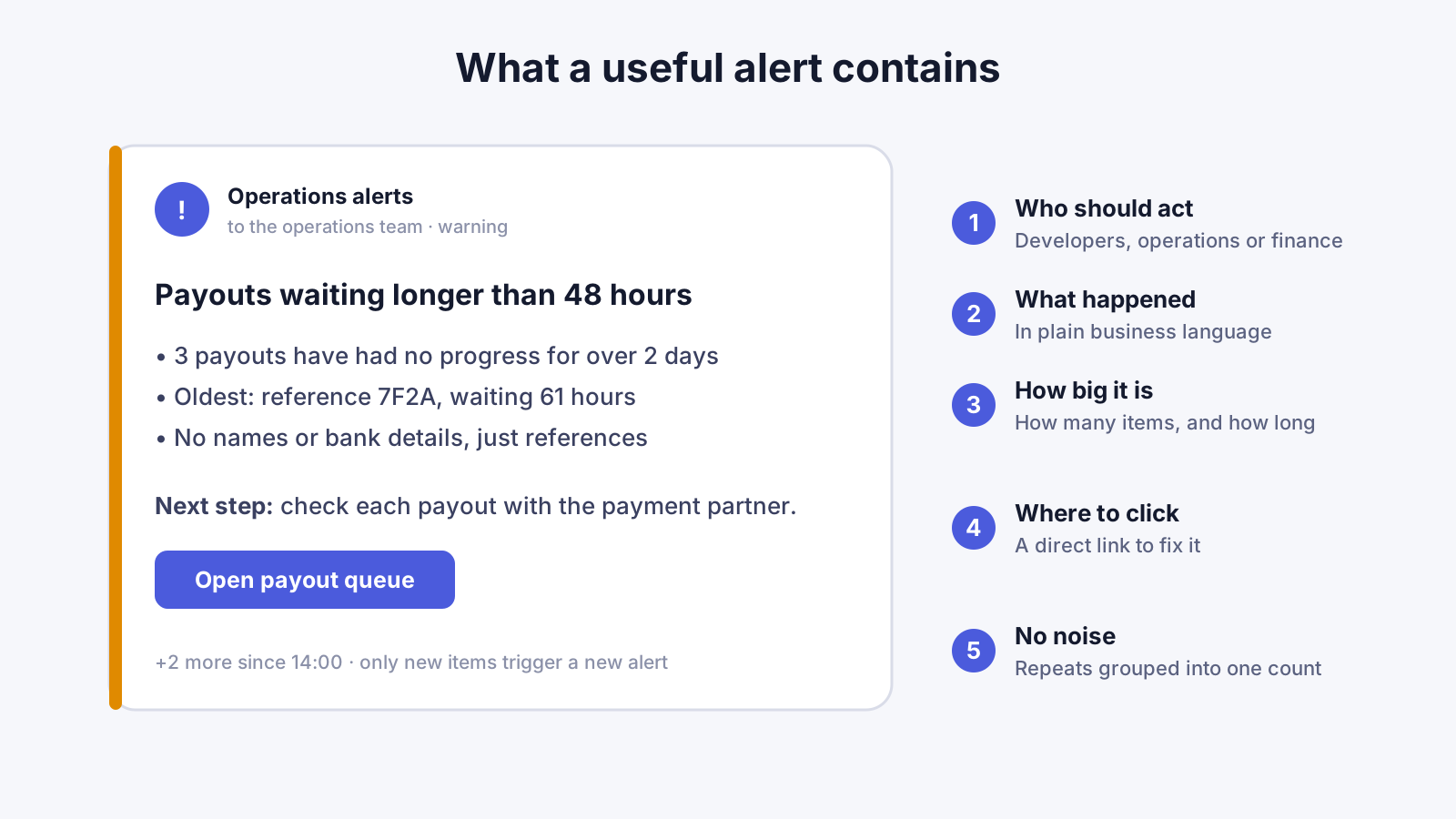
Each alert goes to a tool your team already uses, such as Slack, Discord or email, so there is nothing new to learn. It says what happened and how many items are affected, with a direct link to the screen where someone can act. Alerts carry reference numbers and links, not customer names or bank details, so they are safe to post in a shared team channel.

Only new problems should make noise
A noisy alert system is worse than none. If a channel posts the same warning fifty times a day, people learn to ignore it, and the one alert that matters gets lost. Google's site reliability engineers make the same point in their guidance on monitoring: rules that alert a person should be simple, point to a clear problem, and need someone to act.
So we design our alerts to stay quiet unless something has changed:
- Only new problems raise an alert. When we switch monitoring on, older items that were already known do not flood the channel. The system tracks what it has already reported and speaks up only about what is new.
- Repeats are grouped. If the same problem keeps happening, the team gets one message with a count ("plus 12 more since 2pm"), not twelve separate messages.
- Urgency is matched to the right people. A technical fault goes to the developers. A question about a payout or a refund goes to the operations team. A failure that could cost real money also goes out by direct email, so it does not depend on one person reading one chat channel.
We also use AI to help triage alerts. When something fires, it can gather the related records, recent activity and likely cause into a short summary, so the person handling it starts with context instead of a blank page. People still make the decisions.
How this works for two clients we support
A US online gaming platform
For a US online gaming platform we support, money moves constantly: players buy packages, win prizes and request withdrawals. A failure in any of those steps affects real people's money, so we built monitoring around the money itself.
Every minute, the system records simple health readings: how many purchases were started compared with how many were paid, how many withdrawals are in review or in progress and how long the oldest has been waiting, and how long background work has been queuing. Those readings feed 14 money-flow alarms in the cloud, sorted into critical and warning levels. Critical alarms post to the team's chat and go out by direct email as well.
On top of that, Slack watchdogs check every five minutes for the quiet problems: payouts that have sat with the payment partner too long without progress, books that no longer balance, a payment partner reporting success on an order the platform had already closed, and refunds or chargebacks that need a person to review. Each alert links directly to the right record in the platform's back office.
One of the more advanced checks is statistical. Each game is designed to pay back a known share of what is played over time. A daily check compares each game's actual payouts with that expected rate. Because games naturally swing up and down, it only alerts when the gap is large enough, over enough play, that it is very unlikely to be chance. The alert includes the evidence and a link to switch the game off if needed. A problem that might otherwise surface in a monthly report becomes something the team can act on within a day.
A South African payments provider
For a South African payments provider we support, a key part of the service is delivering payroll files and notices to employers by email. Here the important question is not "did we send it?" but "did they receive it?"
When an email service accepts a message, that does not mean the recipient got it. So every 15 minutes, the system reads the delivery-failure notices that come back to the sending mailbox. Each bounce is recorded once and matched to the delivery it belongs to. If a payroll file bounced, that delivery is marked as failed, the retry is reopened, and an alert is raised so someone can confirm the right address. The system never counts a bounced file as delivered.
Other emails, such as reminders and member notices, are queued and retried automatically if sending fails. Critical failures, such as background work that stops responding or a financial task that cannot complete, post straight to the team's Discord channel. And if a payroll file cannot be produced, the screen explains why in plain language and lets the approver try again.

What this means for your business
You do not need to be a gaming platform or a payments company to benefit. The same idea works for any business that takes payments, delivers something, or sends important documents.
For an online shop, it means knowing the same morning if an order was paid but never packed, if a courier booking failed, or if stock sold out while orders were still coming in. You fix it before the customer emails you, rather than after they leave a review.
For a service business, it means knowing when a booking was paid for but never confirmed, when a quote or contract email bounced, or when a customer's account was not set up after sign-up. These are the gaps that quietly turn new customers into lost ones.
For a finance team, it means a daily check that your records still agree with each other and with your bank or payment provider, alerts on refunds or payouts that have been waiting too long, and a flag when something pays out at an unusual rate. Month-end becomes a confirmation rather than an investigation.
In each case the value is the same:
- Less money lost. Problems are caught in hours, not weeks, when they are small and cheap to fix.
- Less time wasted. Your team stops checking reports by hand to see if anything went wrong. The system tells them, with a link to the exact record.
- Lower risk. Unusual patterns, such as payouts above the expected rate, are spotted early instead of after the damage is done.
- More customer trust. Customers get what they paid for, and on the rare occasion something does go wrong, you contact them first.

How Dev3 Studio can help
We build web apps, mobile apps, dashboards, internal tools and process automation for businesses in South Africa and abroad. Business-level monitoring is part of how we design those systems, not an add-on at the end.
If you already have a system, we start by listing with you the promises your business makes to customers and suppliers, and how each could quietly fail. We add checks for the ones that matter most, route alerts to the tools your team already uses, and link each alert to a screen where the problem can be fixed. Where it helps, we build the dashboard or internal tool behind that link, and automate the fix where it is safe, such as resending a bounced email.
If you are planning a new system, we build these checks in from the first version, so you never have to rely on "the server is up" as your measure of a healthy business.
If you would like to know which quiet failures could be costing your business money, get in touch with Dev3 Studio and we will talk it through with you.

What is the difference between uptime monitoring and business-level monitoring?
Uptime monitoring checks whether your website or app is switched on and responding. Business-level monitoring checks whether it is doing its job: that paid orders are fulfilled, payouts go out on time, records still balance and important emails are actually delivered. You need both, but only the second catches the quiet failures that cost money.
Will my team be flooded with alerts?
No. We design alerts so that only new problems raise one. Repeats of the same problem are grouped into a single message with a count, there is a quiet period after each alert, and each alert goes only to the people who need to act on it.
Where do the alerts arrive?
In the tools your team already uses, such as Slack, Discord or email. Each alert says what happened and how many items are affected, and links straight to the record or screen where someone can fix it.
Can you add this to a system we already have?
Usually, yes. We start by listing the promises your business makes to customers and suppliers and how each could quietly fail, then add checks for the most important ones. Where needed, we also build the dashboard or internal tool the alert links to.
How is AI used in this kind of monitoring?
When an alert fires, AI can gather the related records, recent activity and likely cause into a short summary, so the person handling it starts with context. People still make the decisions.