Case Study
Keeping Personal Data Safe Inside Your Business Software Under POPIA
By Rohit Menon

When people picture a data breach, they usually picture a hacker. In practice, most personal information slips out of a business through quieter doors: an analytics tool that records what staff type, an automated email that carries an ID number to a supplier, or a screen that shows a junior employee everyone's salary. Nobody breaks in. The software simply shares more than it should.
South Africa's Information Regulator has said as much. Speaking about the 788 security compromise notifications it received between January and March 2026, the Regulator said that most of the notifications recorded that year were the result of human error.
If you are new to the Protection of Personal Information Act (POPIA), start with our overview of what your website needs for POPIA compliance. That article covers the public face of your business: privacy notices, cookie consent and secure forms. This one goes deeper, into the business systems behind the website: the admin portals, staff apps, payroll tools and reporting dashboards where the most sensitive information actually lives.
Important: This article is a practical guide, not legal advice. For questions about your own obligations, speak to a qualified attorney.

Where Business Software Quietly Shares Personal Data
Businesses that handle ID numbers, bank details, salaries or signed documents tend to expose them in the same five places. None of these need an attacker. They are side effects of how the software was put together.
Analytics tools recording what people type
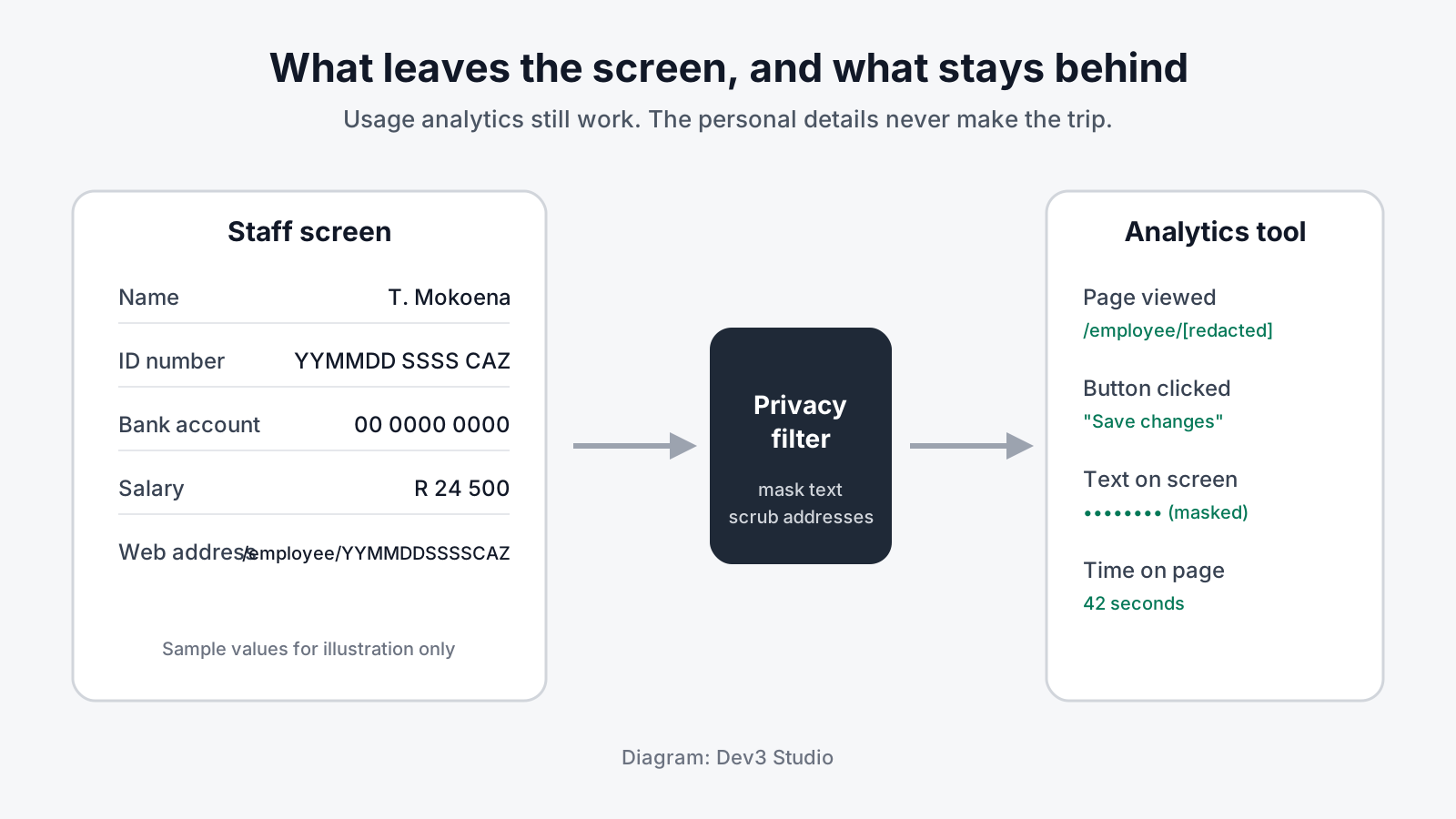
Usage analytics help you see which screens staff use and where they get stuck. Many analytics tools, however, record clicks, on-screen text and form inputs automatically. On a screen that lists employees, that can mean ID numbers, bank details and salary figures travelling to an outside analytics company with every visit.
ID numbers in web addresses and emails
Web addresses get copied into browser history, analytics reports and server logs. If a page address contains a South African ID number, or a search for an ID number ends up in the address bar, that number spreads wherever the address goes. Automated emails are similar: a notification that includes an employee's ID number hands that number to a third party who may not need it.
Staff seeing data they don't need
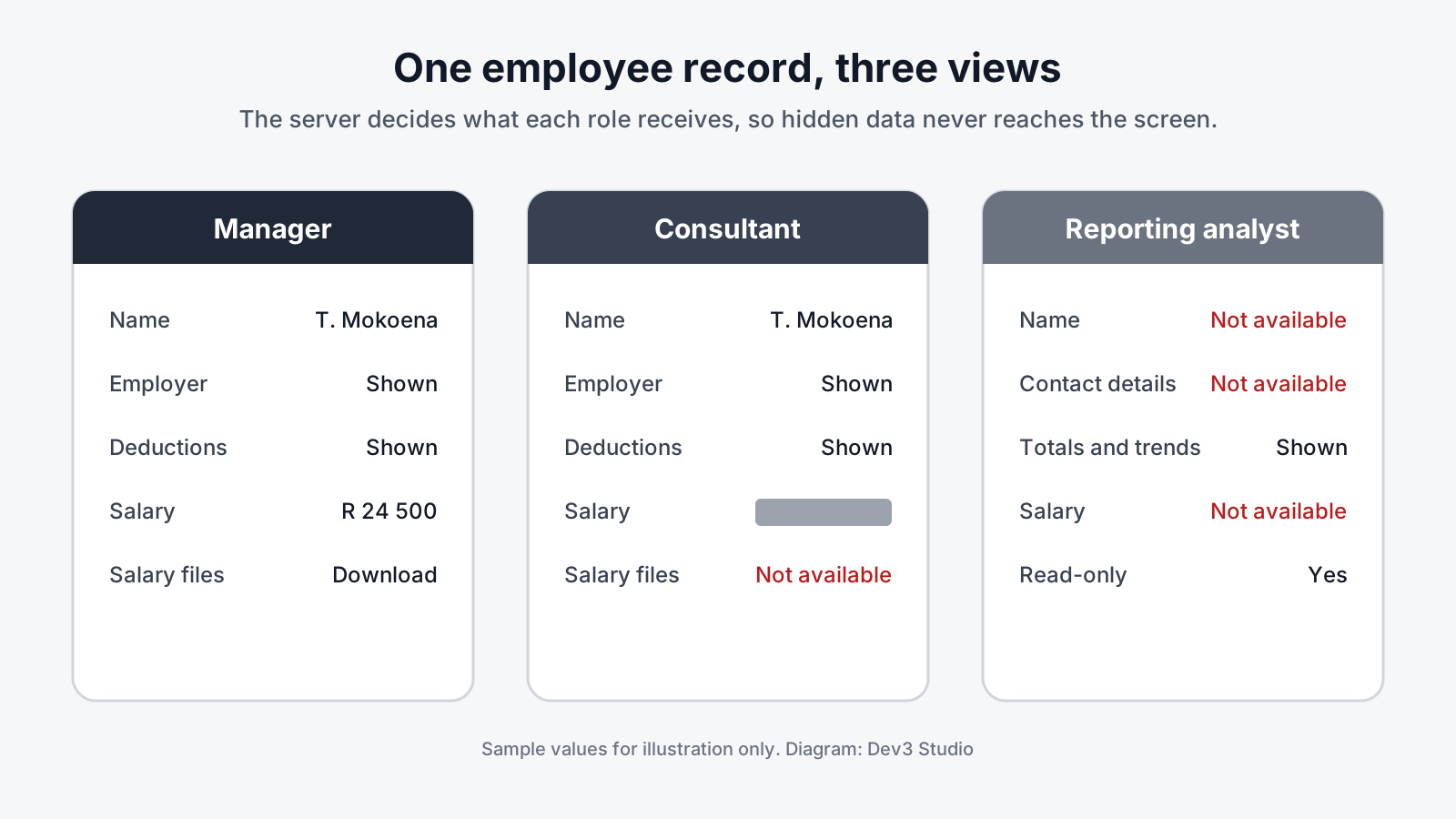
POPIA asks you to take reasonable technical and organisational measures to protect personal information (section 19). If every staff member can open every record, a consultant who only needs to check a deduction can also see what the person earns. Hiding a column on screen is not enough if the information is still sent to their device.
Databases that store everything in plain text
Encrypting the connection between a browser and your server is now standard. Encrypting the personal information inside the database is far less common. Without it, anyone who gets hold of a database copy or backup can read ID numbers and bank details directly.
Signatures and documents copied over and over
Digital signature pads and document uploads often save a new copy every time someone makes a change. A single signature can leave several permanent images behind, each one a copy of personal information that nobody owns, nobody uses and nobody will remember to delete.
What the Information Regulator Expects
The Regulator is no longer just issuing guidance. By August 2026 it had received more than 8,000 security compromise notifications since enforcement began, and it expected more than 3,000 in the current financial year alone. It also noted that some organisations do not report at all, so the true number is higher.
Penalties are real and growing. POPIA allows administrative fines of up to R10 million, and failing to comply with an enforcement notice is a criminal offence. In October 2026, the Regulator fined one of South Africa's major banks R1 million after a problem in its mobile app showed home loan applicants' personal details, including account numbers, to people who should not have seen them. The Regulator found that the bank had not met POPIA's security safeguards. Earlier fines include R5 million against the Department of Basic Education for not complying with an enforcement notice.
When something does go wrong, section 22 of POPIA requires you to notify the Regulator and the affected people as soon as reasonably possible. Since April 2025, those reports must be submitted through the Regulator's online eServices portal, and the Regulator's fact sheet on security compromises says every compromise must be reported, whatever its perceived risk.
The practical lesson: the cheapest notification is the one you never have to send, because the data was never exposed in the first place.
The Privacy Checks We Build In by Default
At Dev3 Studio, we treat these checks as part of building business software properly, not as an extra. Here is what we design in, with examples from systems we build and support for a South African payments provider that handles employee ID numbers, bank details and salaries, and a US online gaming platform.
Personal data encrypted inside the database
For the payments provider, we designed encryption for every sensitive field in the database, including ID numbers, bank details, imported files, notification text and audit records. Each value is encrypted individually, and the encryption keys are stored separately from the database and its backups. Staff can still search for a person by part of an ID number, because the system uses a separate, protected search index rather than reading plain text.
Before any real data is touched, we rehearsed the full switch-over on a copy holding one million synthetic records. The conversion finished in under 23 minutes, and a search across a million encrypted records came back in less than a tenth of a second. A separate recovery drill confirmed that the process can be stopped and resumed safely, that the wrong keys are refused rather than producing garbled data, and that keys can be replaced later without losing anything. Every check passed.
Analytics that mask sensitive fields
On the provider's staff applications, automatic click recording is switched off, all on-screen text is masked before it reaches the analytics tool, and any ID number in a page address is replaced with a placeholder before an event is sent. Search terms are kept out of the address bar entirely, so searching for an employee's ID number never becomes part of a web address. The business still sees how its tools are used.
Sensitive data shown according to staff role
Consultants on the provider's desktop system can look up employees and deductions, but salary amounts are blanked out by the server before they leave it, and appear as a censored placeholder on screen. The same rule applies to salary lists and to downloads of salary import files. Managers and administrators see full figures as before.

Automated emails stripped of identifiers
When an employee withdraws consent for a voluntary deduction, staff capture the withdrawal along with the signed cancellation form. The third party involved learns about it from its regular cycle report, where the line simply shows as blocked. No email containing the employee's ID number is sent at all. Removing the disclosure entirely is simpler and safer than sending it and then having to track who received it.
A reporting login that only sees non-personal data
For the US gaming platform, we set up a dedicated, read-only login for the business's reporting dashboards. It works from a separate copy of the database and can only see an approved list of columns. Email addresses, names, dates of birth, phone numbers, home addresses, password data, sign-up IP addresses and advertising tracking details are all left out. Analysts get the totals and trends they need, and payout and sign-up details stay out of reach.
Personal data sent only to the apps that need it
The payments provider also supports a member-facing mobile app. Rather than sending salary records from the core system to the app, members enter their own take-home pay, and the app works from that. Salary data stays inside the system that needs it.
Documents and signatures stored once, at submission
On the provider's online application form, signature strokes are held in the applicant's browser and saved once, when the form is submitted, instead of every time the pad changes. Supporting documents follow the same rule. Because the storage keeps old versions of files, simply overwriting an image would not be enough. When a file is deleted, the stored file goes first and its record second, so nothing is left behind that cannot be found and cleaned up later.

How we find these paths in the first place
We use AI proactively to trace where personal information travels through a system: into analytics events, email templates, web addresses, file storage and reports. Every finding is then reviewed and confirmed by one of our engineers before anything changes. It lets us check far more paths, far faster, than a manual review alone.
What This Means for Your Business
You do not need to be a bank to carry this risk. If your systems hold ID numbers, bank details, payslips, medical information or signed contracts, the same quiet leaks apply. Building these checks in from the start gives you:
- Lower risk of a reportable incident. Data that never reaches an analytics tool, an inbox or the wrong screen cannot be exposed there.
- Less to explain if something does go wrong. Encrypted data and minimal copies make any incident smaller and easier to report honestly.
- Lower cost. Designing privacy in during a build costs far less than reworking a live system after a complaint or an enforcement notice.
- Customer and partner trust. Larger clients increasingly ask suppliers how they protect personal information. Clear, demonstrable answers help you win and keep that business.
- Staff who can do their jobs without seeing what they shouldn't. Role-based screens protect employees from accidental exposure too.
A quick self-check: does your analytics tool record form inputs? Do any page addresses contain ID numbers? Can every staff member see salaries? Is personal information encrypted inside your database, and have you ever rehearsed restoring it? If you are not sure, that is worth finding out.
How Dev3 Studio Can Help
Dev3 Studio builds web apps, mobile apps, internal tools, dashboards and process automation for South African and international businesses, with compliance-aware development as standard. We can review an existing system to map where personal information flows, or design a new one with these checks built in from day one. We handle the technical side and work alongside your legal adviser on the rest.
If your business software handles sensitive personal information and you want to know where it travels, get in touch with Dev3 Studio.

If my website is POPIA compliant, are my internal systems covered too?
Not necessarily. A privacy notice and cookie consent cover your public website, but admin portals, staff apps, payroll tools and reporting dashboards often hold more sensitive information. Those systems need their own checks, such as role-based access, encryption inside the database and analytics that never record personal details.
Can analytics tools really cause a POPIA problem?
Yes. Many analytics tools record clicks, on-screen text and page addresses automatically. On screens that show ID numbers, bank details or salaries, that information can be sent to an outside company. Switching off automatic recording, masking on-screen text and removing identifiers from page addresses prevents this while keeping useful usage data.
What happens if personal information is exposed?
Section 22 of POPIA requires you to notify the Information Regulator and the affected people as soon as reasonably possible. Since April 2025, reports must be submitted through the Regulator's online eServices portal. The Regulator can issue enforcement notices and administrative fines of up to R10 million.
Does encrypting our database slow the system down?
It does not have to. In a rehearsal on one million synthetic records, a search across the encrypted data returned results in under a tenth of a second, because searches use a separate protected index rather than reading plain text.
Can Dev3 Studio review an existing system rather than build a new one?
Yes. We can map where personal information travels through your current software, including analytics, emails, web addresses, file storage and reports, and then close the gaps. We handle the technical work and work alongside your legal adviser.