
A web application can work perfectly for every customer and still look almost empty to Google. The features that make a modern app useful, such as logins, content limited by region or login, age checks, welcome pop-ups and rich imagery, are often the same things that hide it from search engines or make it too slow to rank.
The difficult part is that nothing looks broken. Customers sign in, browse and buy. Your team tests every screen and it all works. Most owners only find out there is a problem months later, when the search traffic they were counting on simply doesn't arrive.
This article explains why that happens, what we check and build into every web application to prevent it, and what a recent optimisation pass on a large platform we support looked like in practice.
Why a Working Site Can Be Invisible
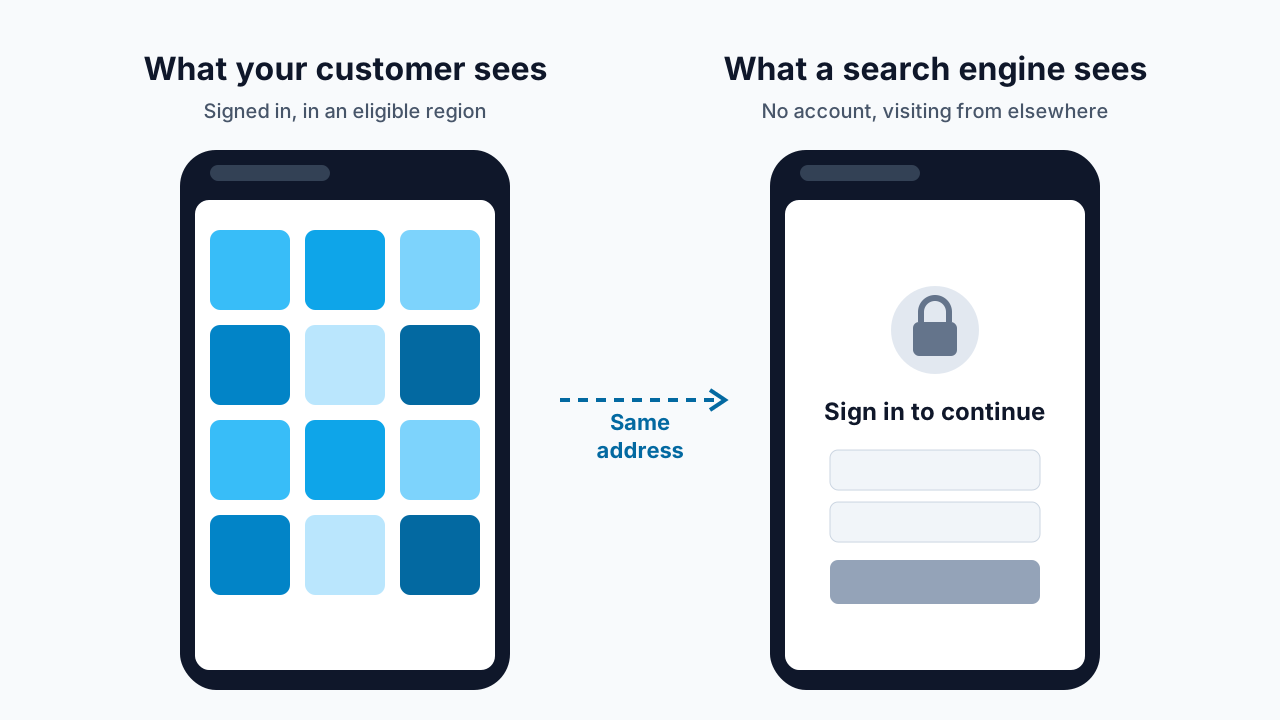
Google discovers your pages with an automated visitor, usually called a crawler. It doesn't have an account, it doesn't tap "I accept" on a pop-up, and it usually visits from a data centre in the United States. So if your app shows its real content only after someone signs in, or only to visitors in certain regions, the crawler sees whatever an anonymous, out-of-region stranger sees. Often that is a login box, an error message, or a page that says "nothing to show here".
Google is also judging your site mainly as a phone sees it. Its mobile-first indexing guidance says it uses the mobile version of a page for indexing and ranking. That matters in South Africa, where StatCounter's figures show more than half of web visits now come from mobile devices, many of them on prepaid data and mid-range handsets.
Speed is the other half of the story. Google's own research found that 53% of mobile visits are abandoned when a page takes longer than three seconds to load. A page that is technically visible but slow still loses both rankings and customers.
Giving Search Engines a Fair View of Gated Content
The first thing we check is what a search engine actually receives. If important content sits behind a login or a region check, we build a public version of those pages for search engines, while customers keep exactly the gated experience the business needs.
This has to be done within Google's rules. Showing search engines something different from what people see is called cloaking, and Google treats it as spam. The safe approach, described in Google's guidance on serving rendered pages to crawlers and on structured data for subscription and gated content, is to give the crawler the same information a qualifying customer would see, not a different or exaggerated version of it. We also lean on server-side rendering, which Google recommends as the long-term approach, so the real content is in the page from the first moment rather than assembled later in the browser.
For a US online gaming platform we support, the product catalogue was shown to customers only after the app had checked where they were. Because a crawler never passes that check, the catalogue pages looked empty from the outside. We built a crawler-friendly view that renders the same public catalogue on the server for known search engines, while signed-in customers see no change at all. That made about 3,700 product pages visible to search.

The Search Foundations We Build Into Every App
Once search engines can reach the content, they need clear signposts. These are the basics we set up on every web application we build or support.
A sitemap and robots rules. A sitemap is a list of every page you want found. Robots rules tell crawlers which areas to skip, such as account screens, checkout steps and test environments. Test and staging copies of the site are told to stay out of search entirely, so they never compete with the real one.
One official address per page. The same page can often be reached through several web addresses, for example with tracking tags from a marketing campaign or a sign-in prompt added to the end. We mark one address as the official (canonical) version so Google combines the credit instead of splitting it across duplicates.
A unique title and description for every page. These are the words people see in search results before they decide to click. Generic or repeated titles make pages look interchangeable. Our article on website metadata and OpenGraph covers this in more detail.
A crawlable directory, and a guide page per product or service. Apps often rely on search boxes, filters and endless scrolling, which crawlers don't use. A plain directory page linking to every product gives search engines a path to all of them. For the gaming platform we added a full catalogue directory, linked it from the site footer, and published a guide page for every product describing what it is and how it works. Each guide is a page that can rank for the questions customers actually type.
Share cards for every link. When someone shares a page on WhatsApp, LinkedIn or Facebook, a share card controls the image, title and summary that appear. Without one, the preview may be blank or pull a random image, and fewer people click.

Speed: The Part Customers Feel
Search engines reward fast pages because customers do. As a platform grows, new design assets, campaigns and catalogue items are added constantly, and page weight creeps up quietly. A regular optimisation pass keeps that growth in check. Here is what one recent pass on the gaming platform involved.
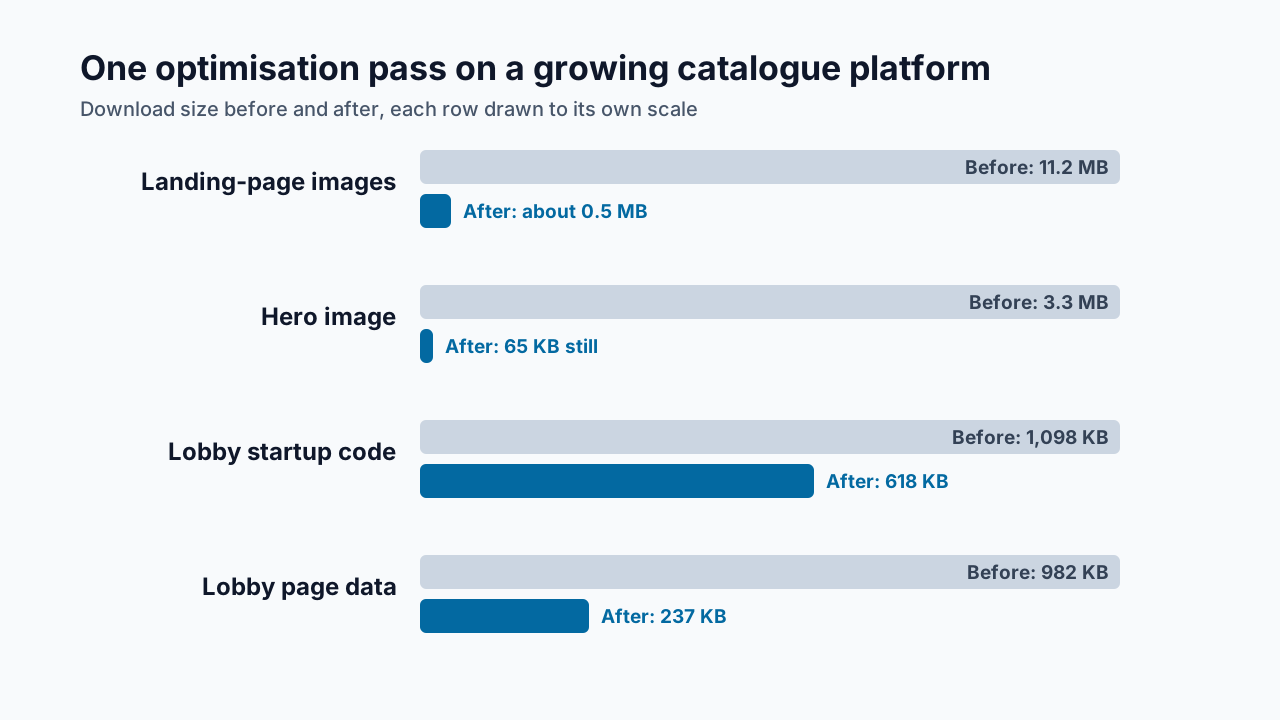
Images sized for the space they're shown in. Designers rightly supply artwork at high resolution so it stays sharp on any screen. But a phone downloading a large original only to shrink it into a small slot wastes data and time. One 1.9 MB image, for instance, was being shown in a space 168 pixels wide. We produced versions at a sensible size for each slot in modern formats, and loaded images further down the page only when the visitor scrolls towards them. Landing-page image weight went from 11.2 MB to about 0.5 MB. Our guide to image optimisation for the web explains the techniques.
Moving images, without the weight. The landing page's hero banner was designed as a 3.3 MB animated image. It now loads as a 65 KB still image straight away, and a small looping video takes over once the page has finished loading. Visitors who have asked their phone to reduce motion or save data simply keep the still image.
Less code before the first screen. On the product lobby, the busiest page in the app, we load features that only open when tapped, such as search and promotions windows, on demand. That cut the startup code from 1,098 KB to 618 KB. As the catalogue grew past 3,700 items, we also changed the lobby to send only what the first screen needs with the page, and fetch the rest of the catalogue in the background. That cut its page data from 982 KB to 237 KB.
Analytics loaded after the content, not before. Marketing and analytics tools are important, but customers didn't come to load them. We set them to start once the page has loaded and the phone is idle, while making sure no page view or sign-up event is lost along the way.
Accessible, Tappable, Usable
Search visibility and accessibility overlap more than most people expect. Buttons and links need to be big enough to tap with a thumb; the international accessibility standard (WCAG 2.2) sets a minimum of 24 by 24 pixels. Links need to be real links, so that keyboards, screen readers and crawlers can all follow them. On the gaming platform, the same optimisation pass checked every control on the landing page against that standard, and made sure the sign-in and registration links can be reached by keyboard users and search engines alike.
Our accessibility basics article goes further, but the principle is simple: a page that works for everyone tends to work for search engines too.

What This Means for Your Business
If your business depends on a web application, whether that is an online store, a booking system, a member portal or a product catalogue, search visibility affects your costs directly.
Lower customer acquisition costs. Every visitor who finds you through search is one you didn't pay an advertising platform for. If Google can't see your pages, you are left paying for traffic you could have earned.
Faster pages convert better. Lighter pages load quicker on prepaid data and older phones, so more of the people who arrive actually stay, browse and buy.
Fewer surprises. Problems like hidden catalogues or duplicate addresses rarely show up in normal testing. Checking for them before launch, and on every release afterwards, means you don't discover them through a disappointing marketing report.
Better first impressions. Clear search listings and proper share cards make your business look established and trustworthy before anyone even clicks.
Protection from penalties. Doing this within Google's rules means you gain visibility without risking the kind of shortcut that can get a site demoted.
How Dev3 Studio Can Help
We build search visibility and performance into every web application from the start, and we review them as part of ongoing support. We use AI tools proactively to help us audit large sites quickly, spot pages that search engines can't reach, and flag performance regressions early, with our developers checking and acting on every finding.
Whether you are planning a new web app, have an existing platform that isn't getting the search traffic it should, or want an independent check of how Google sees your site, we can help. Tell us about your project on our contact page and we will take a look.

Why can't Google see pages that my customers can see?
Google's crawler visits without an account, doesn't accept pop-ups and usually comes from the United States. If your content only appears after signing in or passing a region check, the crawler sees the same empty or blocked page a stranger would.
Is it allowed to show search engines a version of content that sits behind a login?
Yes, as long as the search engine receives the same information a qualifying customer would see. Showing search engines different or exaggerated content is cloaking, which Google treats as spam. We follow Google's published guidance on gated content and server rendering.
Does page speed really affect search rankings and sales?
Yes. Google uses page experience signals and judges sites mainly as a phone sees them, and its research found that more than half of mobile visits are abandoned when a page takes longer than three seconds to load. Lighter pages keep more visitors.
What are the basic search foundations every web app should have?
A sitemap and robots rules, one official address per page, a unique title and description for every page, a crawlable directory with a page per product or service, share cards for links, images sized for where they appear, analytics that load after the content, and buttons large enough to tap.
How do I know if my web app has a search visibility problem?
Common signs are pages missing from Google search results, low search traffic despite a busy app, and slow mobile load times. Google Search Console and PageSpeed Insights show much of this, and Dev3 Studio can run a full check of how search engines see your site.